Serial com - RTS delay to switch ON/OFF transmitter

Discussions about the Liberty BASIC language, with particular reference to LB Booster
flotul
Posts: 23
Joined: Fri Apr 06, 2018 7:06 am

Serial com - RTS delay to switch ON/OFF transmitter

Post by flotul »

Hi,

To broadcast some data, I'm using simple serial transceivers.

Its a one-way communication, from 1 transmitter to multiples receivers. There is no need for any kind of security - the projet is ultra basic (Kiss).

In some cases, especially while testing or checking the system, I use a second transmitter.

Unfortunately, if one transmitter is constantly sending, the second one will mostly fail transmitting its data - the receivers aren't be able to listen to the second transmitter, I guess.

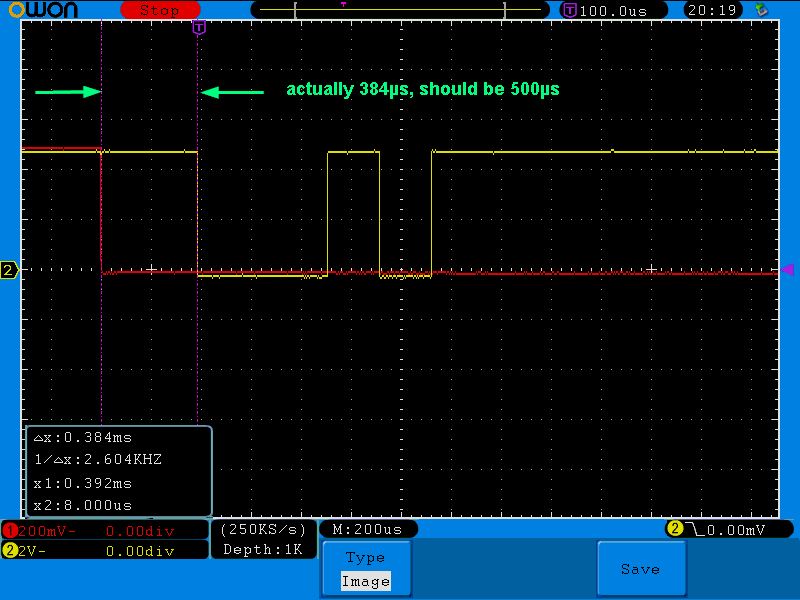
I'd like to use the RTS signal (red in scope) as the switch for the transceiver to go from RX to TX and then back to RX mode after the data (yellow in scope) has been sent.

Does LBB handle RTS and if "yes". is there a eay to augment the delay between the time RTS goes from LOW to the first data transmitted?

Thanks for any help ;)

Image
guest
Site Admin
Posts: 237
Joined: Tue Apr 03, 2018 1:34 pm

Re: Serial com - RTS delay to switch ON/OFF transmitter

Post by guest »

flotul wrote: Wed Apr 15, 2026 10:52 am Does LBB handle RTS and if "yes". is there a eay to augment the delay between the time RTS goes from LOW to the first data transmitted?
You can either use the automatic control of RTS which is built into the Windows serial drivers, or you can control it directly from your code.

To use the automatic control of RTS you have to specify it when you open the serial port, as documented by Microsoft here. The options are on, off, hs or tg. I don't think this gives you any control over the delay.

If none of those options does what you want, you would have to control the RTS line yourself. You can do that using the Windows EscapeCommFunction API. This allows you to set the RTS signal (SETRTS) or clear it (CLRRTS).

Hopefully one or other of those approaches will allow you to do what you want.
flotul
Posts: 23
Joined: Fri Apr 06, 2018 7:06 am

Serial com - RTS delay to switch ON/OFF transmitter

Post by flotul »

Here is a piece of code for testing.

Code: Select all

NOMAINWIN

[INITIALISE]
    lpFileName$ = "Com5"
    dwCreationDistribution = _OPEN_EXISTING
    hTemplateFile = _NULL
    
    CALLDLL #kernel32, "CreateFileA", _
    lpFileName$ AS ptr, _
    dwDesiredAccess AS ulong, _
    dwShareMode AS ulong, _
    lpSecurityAttributes AS ulong, _
    dwCreationDistribution AS ulong, _
    dwFlagsAndAttributes AS ulong, _
    hTemplateFile AS ulong, _
    hFileHandle AS ulong
    
    CALLDLL #kernel32, "CloseHandle", _
    hFileHandle AS ulong, _
    result AS long

[OPEN_COM_PORT]
    OPEN lpFileName$;":9600,n,8,1,ds0,cs0,rs" FOR random AS #ComHandle

[GUI_SETUP]
    WindowWidth  = 290
    WindowHeight =  80
    BUTTON #MAIN.BtnSEND,     "Send",     [SEND],     UL, 10, 10, 80, 22
    BUTTON #MAIN.BtnSET_RTS,  "Set RTS",  [SET_RTS],  UL,100, 10, 80, 22
    BUTTON #MAIN.BtnCLEAR_RTS,"Reset RTS",[CLEAR_RTS],UL,190, 10, 80, 22

[MAIN]
    OPEN "Com5" FOR window_nf AS #MAIN
    #MAIN "TRAPCLOSE [QUIT]"
    WAIT

[SEND]
    #ComHandle "Hello World!"
    WAIT

[CLEAR_RTS]
    CALLDLL #kernel32, "EscapeCommFunction", hFileHandle AS ulong, _CLRRTS AS long,_
    result AS long
    WAIT

[SET_RTS]
    CALLDLL #kernel32, "EscapeCommFunction", hFileHandle AS ulong, _SETRTS AS long,_
    result AS long
    WAIT

[QUIT]
    CLOSE #ComHandle
    CLOSE #MAIN
    END

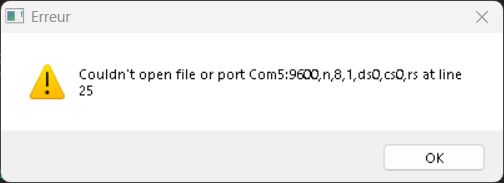
It runs in LB but will yell this warning under LBB:
Image

Code: Select all

23 
24 (OPEN_COM_PORT_)
25 `ComHandle = FN_open(lpFileName$ + ":9600,n,8,1,ds0,cs0,rs", 4)
26 

I don't understand what is wrong :|
flotul
Posts: 23
Joined: Fri Apr 06, 2018 7:06 am

Re: Serial com - RTS delay to switch ON/OFF transmitter

Post by flotul »

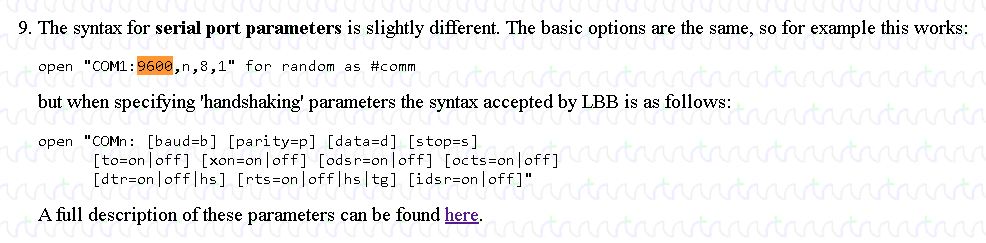
I found this information; unfortunately, I can't understand how to implement the change - in the case parameters are used, I don't see any ponctuation neither handle and so.

Image
flotul
Posts: 23
Joined: Fri Apr 06, 2018 7:06 am

Serial com - RTS delay to switch ON/OFF transmitter

Post by flotul »

Would the correct syntax be something like:

Code: Select all

OPEN lpFileName$;": baud=9600 parity=n data=8 stop=1 odsr=off octs=off rts=off" FOR random AS #ComHandle
Unfortunately, it is not working for now.
flotul
Posts: 23
Joined: Fri Apr 06, 2018 7:06 am

Serial com - RTS delay to switch ON/OFF transmitter

Post by flotul »

"Claude Ai" helped me ;)

Code: Select all

lpFileName$ = "COM9"
comString$  = lpFileName$ + ": baud=9600 parity=n data=8 stop=1 odsr=off octs=off rts=off idsr=off"
And then:

Code: Select all

OPEN comString$ FOR random AS #ComHandle
flotul
Posts: 23
Joined: Fri Apr 06, 2018 7:06 am

Serial com - manually control RTS signal

Post by flotul »

Full code example

Code: Select all

NOMAINWIN

[GUI_SETUP]
    WindowWidth  = 290
    WindowHeight =  80

[INITIALISE]
    BUTTON #MAIN.BtnRTSOFF, "RTS OFF", [RTS_OFF], UL,  60, 10, 80, 22
    BUTTON #MAIN.BtnRTSON,  "RTS ON",  [RTS_ON],  UL, 150, 10, 80, 22

    OPEN "kernel32" FOR dll AS #kernel32
    ComPort$ = "9"
    OPEN "COM" + ComPort$ + ": baud=9600 parity=n data=8 stop=1 odsr=off octs=off rts=off idsr=off" FOR random AS #ComHandle
    hPort = HWND(#ComHandle)

    OPEN "RTS manual ON/OFF" FOR window_nf AS #MAIN
    #MAIN "TRAPCLOSE [QUIT]"
    WAIT

[RTS_ON]
    CALLDLL #kernel32, "EscapeCommFunction", hPort AS ulong, 3 AS long, result AS long
    WAIT

[RTS_OFF]
    CALLDLL #kernel32, "EscapeCommFunction", hPort AS ulong, 4 AS long, result AS long
    WAIT

[QUIT]
    CLOSE #ComHandle
    CLOSE #kernel32
    CLOSE #MAIN
    END